Automations lets Ace watch your signals and models and act for you — escalating slipping leads and reassigning the ones an agent never worked. It answers: how do I make sure nothing falls through the cracks without babysitting it? There are two kinds of automation here: condition-based rules (they watch time and model signals) and event-based playbooks (they fire the instant a Follow Up Boss webhook lands).
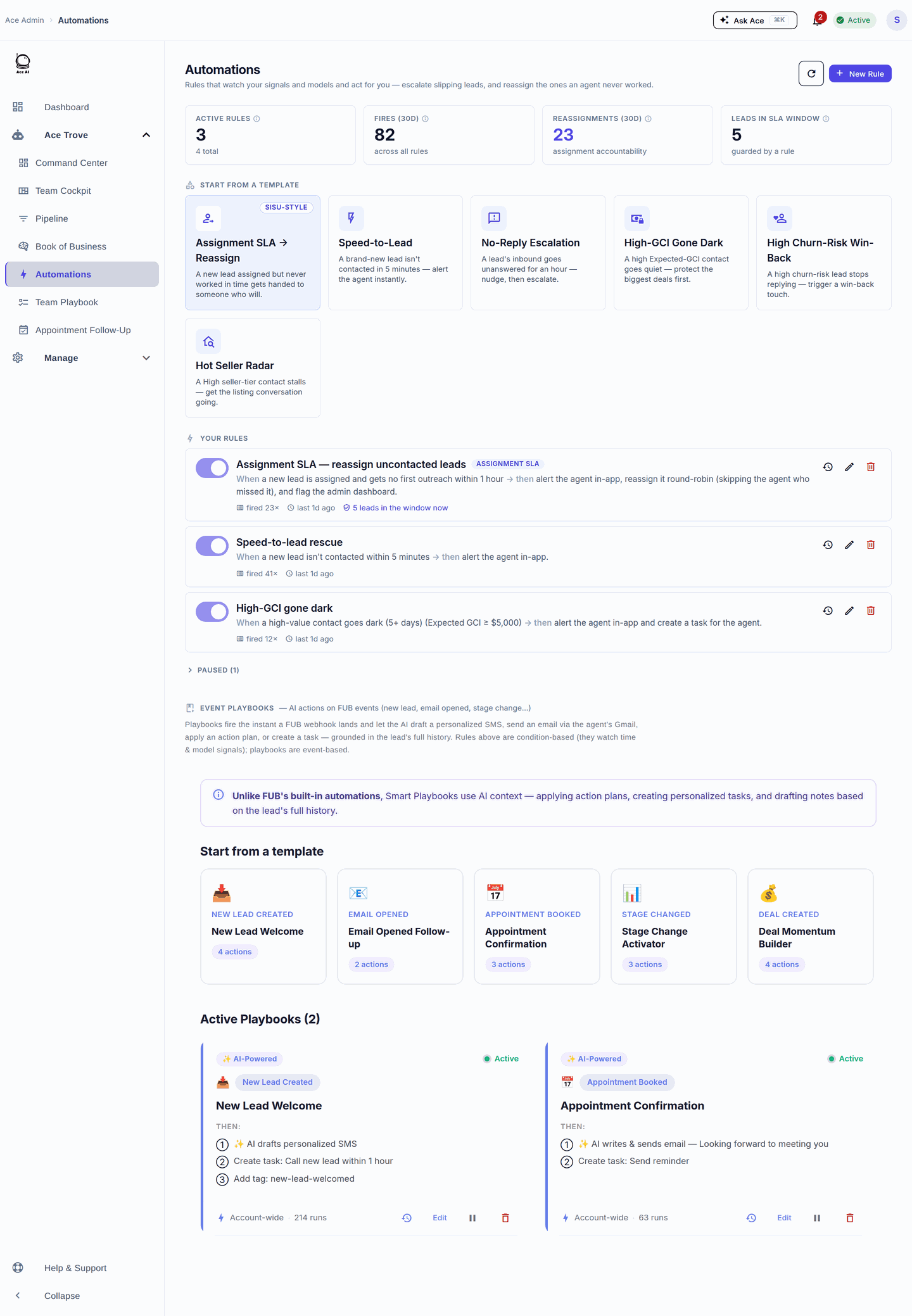
Rules and playbooks with live fire counts — start from a template, then tune the conditions and actions.
The assignment-SLA / reassignment rule
The featured template is Assignment SLA → Reassign: when a new lead is assigned but gets no first outreach within your SLA window, Ace alerts the agent in-app, reassigns the lead round-robin (skipping the agent who missed it), and flags your admin dashboard. It's the single most valuable rule to turn on first — it guarantees a fresh lead never dies in an unresponsive agent's queue. The tile even shows how many leads are in the SLA window right now.
Other rule templates
- Speed-to-Lead — a new lead isn't contacted in 5 minutes; alert the agent instantly.
- No-Reply Escalation — an inbound goes unanswered for an hour; nudge, then escalate.
- High-GCI Gone Dark — a high Expected-GCI contact goes quiet; protect the biggest deals first.
- High Churn-Risk Win-Back — a high-churn contact stops replying; trigger a win-back touch.
- Hot Seller Radar — a high seller-tier contact stalls; get the listing conversation going.
Event playbooks
Playbooks fire on FUB events (new lead, email opened, appointment booked, stage change, deal created) and let Ace draft a personalized SMS, send an email through the agent's Gmail, apply an action plan, or create a task — grounded in the lead's full history. Unlike Follow Up Boss's built-in automations, playbooks use AI context rather than a static template.
Five things to do here
- Turn on Assignment SLA first. Set the window to your team's real standard.
- Add Speed-to-Lead. The two together cover the biggest lead-loss gaps.
- Start small. Enable one or two rules, watch the fire counts for a week, then add more.
- Tune, don't over-fire. If a rule fires too often, tighten its threshold — alert fatigue kills adoption.
- Layer in a playbook. Add "New Lead Welcome" so every new lead gets an instant personalized first touch.
Frequently asked questions
How is this different from FUB's own automations? Rules act on model signals (churn risk, Expected GCI, seller tier) and time-based SLAs; playbooks draft with AI context from the lead's full history. FUB's built-ins are static.
Will an automation send something without me? Rules alert, reassign, and create tasks. Playbook drafts can send on FUB events when you've enabled that action — review your playbook actions before turning them on.
Where did Smart Playbooks go? They're the event playbooks on this same Automations view; the old /playbooks URL redirects here.
Related articles
Was this article helpful?
That’s Great!
Thank you for your feedback
Sorry! We couldn't be helpful
Thank you for your feedback
Feedback sent
We appreciate your effort and will try to fix the article